
Multi-Stopwatch
Multiple parallel stopwatches with lap timing
Run Multiple Timers at Once
Multi-Stopwatch extends your normal stopwatch with powerful additional functions. Run several timers in parallel, track lap times for multiple athletes, and switch between timing modes—all with millisecond accuracy.

Stopwatch Modes
Normal Mode
Run multiple stopwatches simultaneously. Perfect for tracking parallel events, timing multiple tasks, or monitoring several athletes at once.
Switch Mode
Only one timer runs at a time—start a new one and the previous pauses automatically. Ideal for tracking time spent on different activities, billable work, or alternating between projects throughout your day.
Sprint Mode
Designed specifically for coaches and instructors. Large buttons with haptic feedback let you record times without looking at your device. Track multiple runners, swimmers, or athletes with ease.
Key Features
| Feature | Description |
|---|---|
| Parallel Timers | Run multiple stopwatches at the same time |
| Lap Recording | Track split times and laps for each timer |
| Sprint Mode | Large buttons and haptic feedback for hands-free operation |
| Millisecond Accuracy | Precise timing even when running in background |
| Apple Watch | Full stopwatch functionality on your wrist |
| Customizable Display | Adjust toolbar size and time precision |
| Background Operation | Timers continue running when app is minimized |
Perfect For
| User | Use Case |
|---|---|
| Sports Coaches | Time multiple athletes in races and drills |
| Swim Instructors | Track lane times for swimmers |
| Fitness Trainers | Monitor workout intervals for clients |
| Medical Professionals | Track procedures and timing protocols |
| Lifeguards (DLRG) | Rescue operation timing |
| Teachers | Time presentations or test sections |
| Freelancers | Track billable hours across client projects |
| Remote Workers | Monitor time spent on different tasks |
| Consultants | Log hours for multiple clients simultaneously |
| Developers | Time coding sessions and debugging |
| Productivity | Track time across multiple tasks |
How It Works
- Add stopwatches - Create as many timers as you need
- Choose your mode - Normal (parallel) or Switch (one at a time)
- Start timing - Tap to start, lap, and stop
- Record laps - Track split times for each stopwatch
- Review results - View detailed timing data and lap information
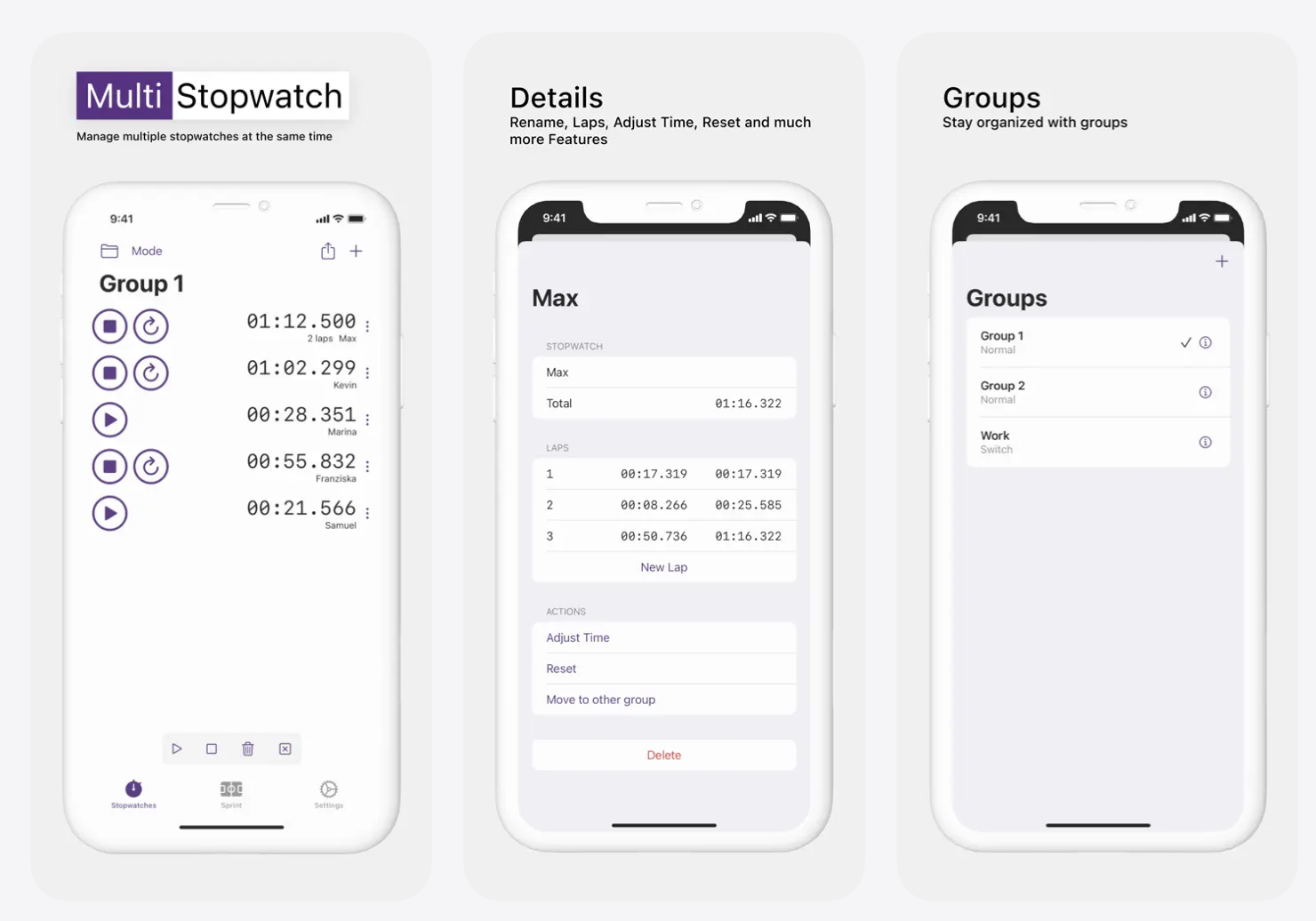 Run multiple stopwatches simultaneously with lap timing and millisecond accuracy
Sprint Mode for Athletes
Sprint mode transforms your device into a professional timing tool:
- Extra large buttons - Easy to tap while watching athletes
- Haptic feedback - Feel confirmation without looking
- Quick lap recording - Capture times for multiple participants
- Visual confirmation - Clear display of recorded times
Available on All Your Devices
| Platform | Support |
|---|---|
| iPhone | Full-featured stopwatch app |
| iPad | Optimized for larger displays |
| Apple Watch | Complete stopwatch on your wrist |
What Users Are Saying
“Perfect for timing multiple runners at practice”
“Simple and efficient - exactly what I needed”
“Great for swim instruction - can track all lanes”
Rated 4.7/5 stars with 364 ratings
Why Coaches Choose Multi-Stopwatch
- Multiple athletes - Time everyone in the same race
- Reliable accuracy - Millisecond precision you can trust
- Works in background - Never lose time when switching apps
- Apple Watch support - Time athletes directly from your wrist
- No distractions - Focused interface for serious timing
Track Work and Billable Hours
Multi-Stopwatch is also a powerful tool for professionals who need to track time across multiple projects:
- Multiple client timers - Run separate stopwatches for each client or project
- Switch mode for task tracking - Automatically pause one timer when starting another
- See where your time goes - Visual breakdown of time spent on different work
- Accurate billing - Precise time records for invoicing clients
- Simple workflow - No complicated setup, just start timing
Whether you’re a freelancer juggling multiple clients, a consultant billing by the hour, or a remote worker tracking productivity, Multi-Stopwatch gives you a straightforward way to monitor time without complex time-tracking software.
Download
Download Multi-Stopwatch and start timing multiple events.
Developer: Applorium Ltd Category: Utilities Age Rating: 4+